
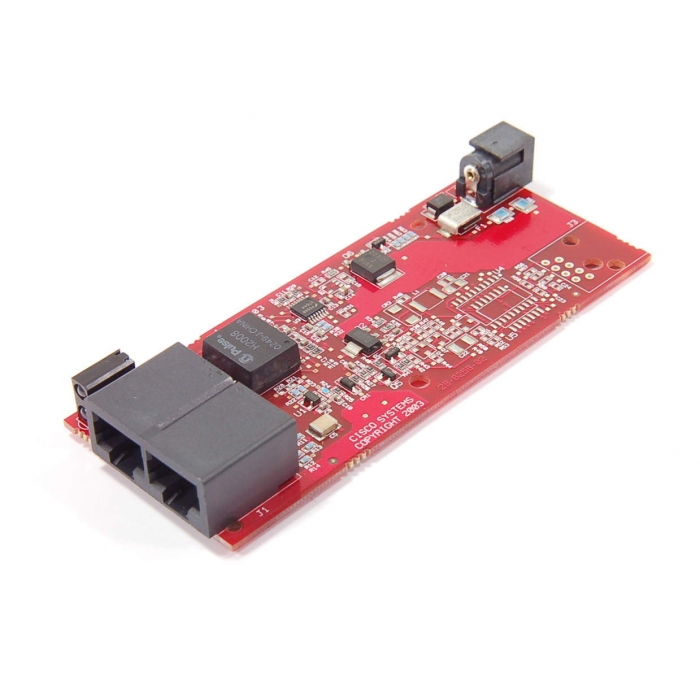
CISCO SYSTEMS - 73-8545-02 Rev. 07 - High-Speed WAN Interface Card, (HWIC) PWB, New
Special Price
$18.98
Regular Price
$29.85
READY TO SHIP - ONLY 60 LEFT IN STOCK!
SKU
154180
CISCO SYSTEMS - 73-8545-02 Rev. 07 - High-Speed WAN Interface Card, (HWIC) PWB, New
Device Type: It is an internal hardware component, specifically a printed circuit board for an HWIC module used in Cisco integrated services routers.
A HWIC (High-Speed WAN Interface Card) slot is a modular expansion slot on Cisco Integrated Services Routers (ISRs) designed for increased data throughput compared to standard WIC slots. It supports WAN connections, serial ports, and Ethernet, offering up to 400 Mbps of bandwidth. They are commonly found on Cisco 1800, 2800, 3800, and some ISR G2 series routers.
HWIC Board, Requires Plug-in Power Supply
Other PWB Markings: FHH0715001P, 28-6258-02
Contains Pulse H2008 0249-J Chip
Installation & Configuration Guides
You can find official documentation for this hardware on the Cisco Support Portal.
1. Hardware Installation: Follow the Installing Cisco Interface Cards guide to physically seat the card in an open HWIC slot.
Step 1: Power off the router.
Step 2: Remove the blank faceplate from the HWIC slot.
Step 3: Align the card with the guide rails and slide it in until the connectors seat.
Step 4: Tighten the captive screws and power on the device.
2. Configuration: Use the HWIC-4ESW Configuration Guide for setting up VLANs and Layer 2 switching. Note that ports on this card are Layer 2 only; you cannot assign IP addresses directly to physical ports. Instead, you must create a VLAN Interface (SVI).
| SKU | 154180 |
|---|---|
| Condition | NEW |
| Part Number | 73-8545-020-07, 73-8545-02 |
CISCO SYSTEMS - 73-8545-02 Rev. 07 - High-Speed WAN Interface Card, (HWIC) PWB, New
Device Type: It is an internal hardware component, specifically a printed circuit board for an HWIC module used in Cisco integrated services routers.
A HWIC (High-Speed WAN Interface Card) slot is a modular expansion slot on Cisco Integrated Services Routers (ISRs) designed for increased data throughput compared to standard WIC slots. It supports WAN connections, serial ports, and Ethernet, offering up to 400 Mbps of bandwidth. They are commonly found on Cisco 1800, 2800, 3800, and some ISR G2 series routers.
HWIC Board, Requires Plug-in Power Supply
Other PWB Markings: FHH0715001P, 28-6258-02
Contains Pulse H2008 0249-J Chip
Installation & Configuration Guides
You can find official documentation for this hardware on the Cisco Support Portal.
1. Hardware Installation: Follow the Installing Cisco Interface Cards guide to physically seat the card in an open HWIC slot.
Step 1: Power off the router.
Step 2: Remove the blank faceplate from the HWIC slot.
Step 3: Align the card with the guide rails and slide it in until the connectors seat.
Step 4: Tighten the captive screws and power on the device.
2. Configuration: Use the HWIC-4ESW Configuration Guide for setting up VLANs and Layer 2 switching. Note that ports on this card are Layer 2 only; you cannot assign IP addresses directly to physical ports. Instead, you must create a VLAN Interface (SVI).
